Posts

Showing posts with the label AWX

Ansible Jinja Templates Explained with Real world examples

Image
Here I'm starting this post with famous ARISTOTLE quote. "We are what we repeatedly do. Excellence, then is not an act, but a Habit" Welcome back Ansible Automations and who are habituated as Ansible automation specialists this post for them to give boosted walk through, In this post why Jinja templates, When managing hundreds of Linux servers, it becomes difficult to maintain separate configuration files for each environment. Development, Testing, UAT, and Production environments often require different values such as hostnames, IP addresses, ports, memory settings, and application URLs. Instead of creating multiple configuration files manually, Ansible uses Jinja2 Templates to dynamically generate configuration files during deployment. Jinja2 allows variables, loops, conditions, and filters to be embedded within template files so that a single template can be reused across multiple systems.  I would like to share my experiments with Jinja2 templates usage on the Ansibl...
Step by Step installation of Ansible Tower opensource version AWX

Image
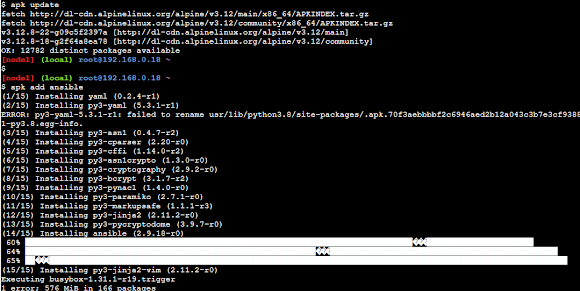
Hello Guys, In this post, I would like to experiment with the installation of AWX on a new variety of Linux that is Alpine Linux. Prerequisites Here I will go with the Alpine Linux which is the default Operating System on  Play with  Docker  alternatively, You must have at least 3 boxes on either vagrant  or Any cloud instances (AWS) 1 Ansible engine remaining 2 for remote nodes AWX is GUI/web tool which is currently broken down to AWX-operator and AWX Task The AWX up to 18 version installations used docker based environments, where it uses the following Docker images from the Docker hub Postgress SQL Rabbit MQ MemCache Steps to install AWX 1. Update the repo on the Alpine Linux apk update 2. Installing with apk package manager 'add' subcommand will do the installation. apk add ansible This will be installing Ansible on Alpine Linux. Ansible installation on Play with Docker (PWD) instance   3. Validate the ansible installation using the version option. an...